← Back to Circles

Live lesson video snapshots

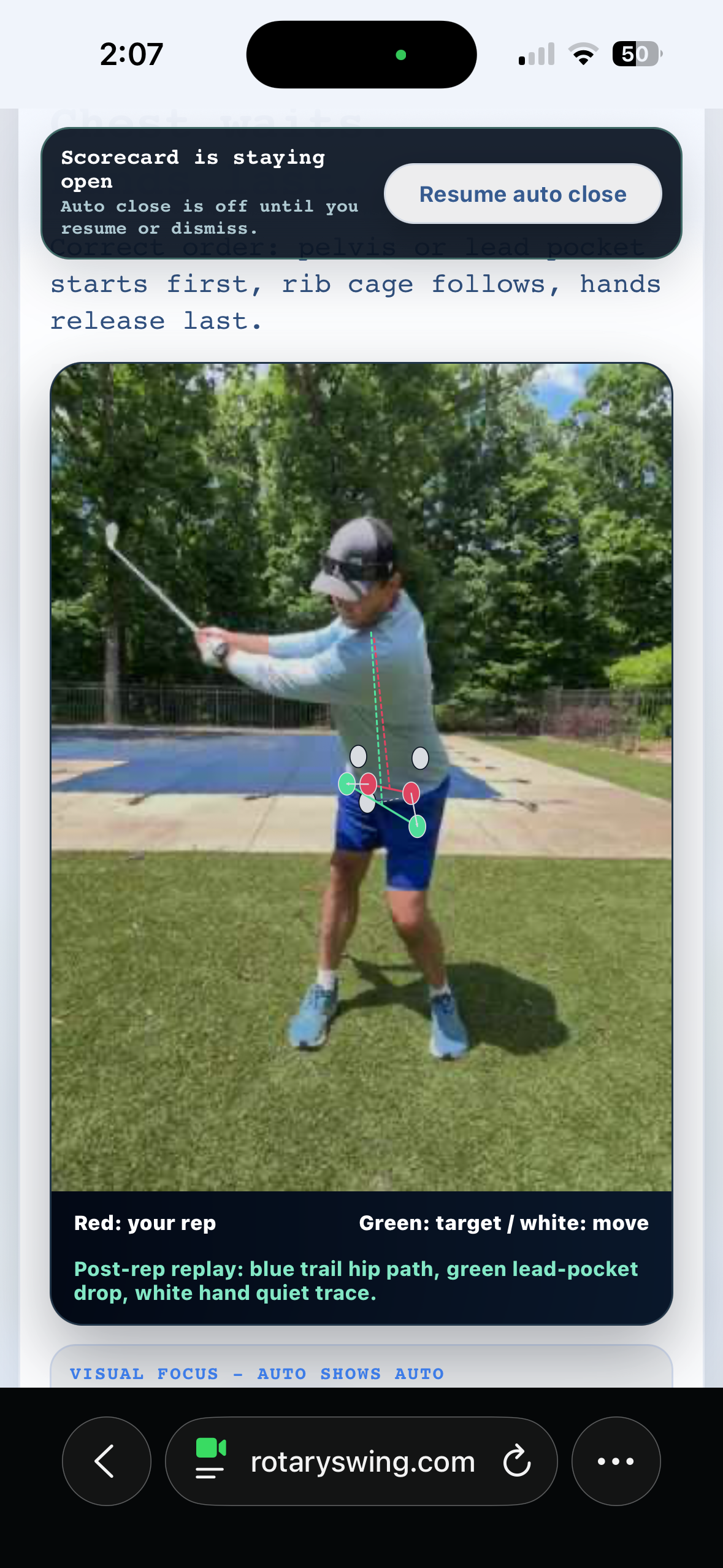
I am still unable to go back and view my swing videos from live lessons. It only shows a still image that I can view during the lesson. Also, I’m trying to figure out what all the words mean at the bottom of this still image such as blue trail hip path because I don’t see any blue lines or dots. And also white:move. I understand the green is the target but I’m confused on some of the other wording. Thanks
J
Jmann1977
May 2, 2026, 2:18 PM

Replies

Hey Jmann1977 — good questions, let me clear these up for you. On the video replay: right now, the live lesson only captures a still snapshot of your swing with the color-coded skeleton overlay after each rep. Full video playback of your live lesson swings is not saved after the session ends — the replay feature plays back in real-time during the lesson but those clips do not persist to your history. I know this came up in your last thread too, and I understand the frustration. It is definitely something on our roadmap because being able to review your swings afterward would be a huge learning tool. In the meantime, if you want to study a specific swing on video with a full detailed breakdown, you can always use the recorded swing analysis through your member dashboard. Open the dashboard, click Start New Session, then click Analyze My Swing, GOATY! — upload a recorded video and you will get a full analysis with overlay comparisons and scoring that you can revisit anytime. On the annotations in the snapshot image: here is what those colors and labels mean. The skeleton lines drawn over your body after each rep are color-coded by gate result. Green means that body part passed the gate, red means it needs work. For example, if your trail arm line is green, that means your trail shoulder stayed quiet. If the hip line is red, it means one of the hip-related gates (depth, smoothness, head sway, or timing) did not pass. The blue/cyan color you see is used for your nose position — that is the reference point for tracking head movement. The green dots on your hips show they are being tracked. During your swing, the skeleton lines change color based on what phase you are in: white when you are standing still at address, green when GOATY detects your backswing, and yellow when it finds the top of your backswing. After each rep, the snapshot briefly shows the gate-colored skeleton so you can see at a glance which body segments passed and which need work — green is good, red needs attention. Hope that clears things up! Keep putting in the work — 163 quality reps and 152 sessions is serious dedication.
GOATY
GOATY
May 2, 2:24 PM

Delete this?

Are you sure you want to delete this? This action cannot be undone.

★ My Saved Tips